


Checking development history…
The latest changes on main, before production approval.
A modernized version of a classic one-axis solar tracker: the ESP32 calculates its own target, measures the real panel angle, drives a linear actuator, exchanges safety states with nearby arrays over ESP-NOW, accepts wind data through Home Assistant or MQTT, and keeps a full local service interface available even when the internet is down.
Track the latest development commit, frozen test candidates, and approved production releases. V13.26 describes the interface reference; published firmware versions are listed below.
The latest changes on main, before production approval.
A frozen release candidate for designated test trackers.
An approved stable release for production installations.
Each entry identifies the source commit. Installing firmware on a tracker is a separate step through ESPHome.
Loading the latest synced project history…
Full Versions & Change HistoryThe project started as a simple way to tilt a panel toward the sun and has grown into a self-contained multi-array controller platform with its own time source, position feedback, safety rules, local web UI, service tests, Home Assistant integration, optional MQTT, and an ESP-NOW safety bus that can operate without cloud services.
The project has evolved from the earlier ESP8266 controllers into a more capable ESP32 reference design. The newer firmware is built to coordinate multiple nearby arrays while keeping each tracker able to make its own safety decisions.
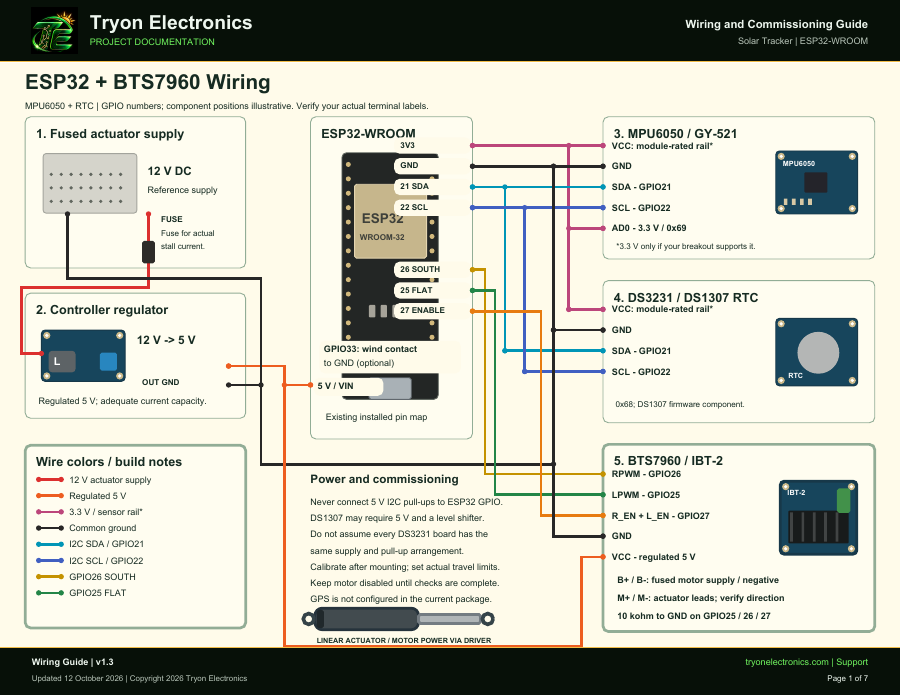
ESP32-WROOM-32 / ESP32 DevKit V1 controller with BTS7960 motor drive, MPU6050 position feedback, RTC fallback, local service UI, MQTT integration, and a physical wind-safe input.
Encrypted ESP-NOW lets nearby tracker controllers exchange safety information directly. A Home Assistant or internet outage does not remove the local radio path between arrays.
The seven-page wiring guide covers both installed ESP32 profiles, shared sensors, calibration, travel limits, and a checklist for each completed installation.
GPIO26 RPWM SOUTH, GPIO25 LPWM FLAT, and GPIO27 connected to both enable inputs. Keep the physical 10 kΩ pull-downs. GPIO33 provides the active-low wind-safe input.
Select packages/solar-tracker.yaml.
GPIO26 SOUTH and GPIO25 FLAT each drive a 2N4401 through 1 kΩ, with a 4.7 kΩ base pull-down. Emitters connect to common ground; collectors connect to the matching OONO control inputs. This profile does not assign GPIO27 or GPIO33.
Select packages/solar-tracker-oono.yaml.
The separate 16-page settings manual explains all 60 exposed runtime controls, defaults and limits, saved settings versus YAML defaults, secret references, hardware package selection, wind protection, MQTT, service tests, backups and Home Assistant card options.
Download Settings & YAML Manual · PDF · v1.2
Both use GPIO21 SDA and GPIO22 SCL. The RTC uses address 0x68; connect MPU6050 AD0 to 3.3 V for 0x69. Check breakout supply ratings and keep ESP32-side I²C pull-ups at 3.3 V. Firmware uses the DS1307 time component; verify battery-backed operation on a DS3231 installation.
Set array_number from 1 through 8 independently of the hardware package. Saved name, number, MQTT prefix, calibration and travel limits survive updates, so verify them on the controller after a rename or rebuild. Measure the installed panel before calibrating; 0° means physically flat.
Guide updated October 12, 2026. Firmware repository access may require permission. Downloading files or pushing GitHub does not install firmware on a controller.
The controller always resolves the selected mode into a requested angle, applies mechanical and safety limits, then compares that target to the measured panel angle.
Calculates solar elevation and azimuth locally from the RTC, saved installation coordinates, and saved panel-facing azimuth. The sun is projected into the tracker's single tilt plane, so the panel only tilts in the physically supported direction.
Lets the user command a specific requested angle from the local web page or Home Assistant while still keeping normal mechanical limits and motor safety protections active.
Commands the saved minimum safe angle. The same low-angle target is also used for wind parking and fail-safe conditions that should not leave the panel highly tilted.
The current V13 controller keeps the large-array motion verification developed in V12.3 and adds redundant wind inputs, multi-array ESP-NOW safety sharing, GPIO33 physical wind-safe input, configurable park/resume hysteresis, and a post-alert safety hold.
A configurable runtime watchdog stops a movement that runs too long. The current default is 120 seconds.
After startup grace, measured panel movement is checked against the commanded direction and requires repeated confirmation before a fault is latched.
The controller evaluates movement in 6-second windows and requires two failed windows after startup grace before declaring that the actuator did not move the panel.
Once calibrated, invalid panel-angle feedback is surfaced as a problem and prevents the controller from blindly continuing normal tracking.
Fresh wind can arrive through the native Home Assistant API or shared MQTT topics. The higher fresh reading is used; 40 mph parks, 30 mph permits the alert to clear, and a safety hold keeps the array parked afterward.
Local wind alerts, manual park commands, peer status, radio tests, and hold-clear requests can travel directly between trackers without routing through Home Assistant or the internet.
| Protection | Current default | Purpose |
|---|---|---|
| Wind park | 40 mph | Fresh network or GPIO33 wind safety overrides normal tracking and requests the safe low-angle position. |
| Wind resume | 30 mph | Hysteresis prevents the wind alert from chattering around the park threshold. |
| Post-alert hold | 10 minutes | Keeps arrays parked after the final wind/manual source clears. |
| Wind-data maximum age | 600 seconds | Separately tracks freshness so stale network wind is not treated as a new reading. |
| Startup grace | 4 seconds | Ignores actuator take-up, panel flex, and MPU filter lag at motor start. |
| Motion window | 6 seconds | Measures real panel-angle progress over a useful interval. |
| Wrong-direction threshold | 0.75° · 3 confirmations | Requires repeated verified movement opposite the command before faulting. |
| No-movement threshold | 0.30° · 2 windows | Allows roughly 16 seconds from motor start before a no-movement fault can latch. |
| Service-test thresholds | 0.15° wrong / 0.08° no-move | Uses more sensitive thresholds during controlled short diagnostic pulses. |
| Service jog watchdog | 2.5 seconds | Hard limit for any manual service motor pulse. |
Internet and Home Assistant add convenience, but the core controller keeps the information it needs locally.
The DS1307 RTC is read at boot and provides local date/time for solar calculations. When network time is available, SNTP updates the system clock and writes the corrected time back to the RTC.
The local service page can synchronize time from a phone/browser, save the installation time zone, and keep RTC time separate from the display zone so daylight-saving rules do not corrupt the stored moment.
A known-good Wi-Fi network remains compiled as a recovery/default network, and a fallback access point can return when station Wi-Fi cannot connect. New credentials can be tested from the service UI.
Calibration and configuration values are stored locally so power loss, Wi-Fi outages, or Home Assistant restarts do not erase the tracker setup.
Service controls are intended for installation and troubleshooting. They are time-limited and blocked when calibration or fault state makes movement unsafe.
The tracker does not need a cloud service to run. Home Assistant and MQTT add dashboards, automation, and integration paths while ESP-NOW handles direct tracker-to-tracker safety sharing.
The custom local dashboard opens in view-only mode. Unlock controls uses the existing web login before changes; writes are authenticated on the ESP32. The updated firmware must be installed to enable this access mode. It exposes tracker state, setup, calibration, safety tuning, service tests, ESP-NOW peer status, diagnostics, Wi-Fi configuration, time/time-zone controls, MQTT settings, and configuration backup/import.
Home Assistant can display angles, tracking state, faults, temperature, wind, calibration, and controls. Pirate Weather wind speed/gust can also feed the tracker through native Home Assistant entities.
MQTT provides a second integration path for Home Assistant, Node-RED, OpenHAB, or custom software. Shared wind topics can feed every array, while each tracker can publish status under its own topic prefix.
The current V13 series builds on the original configurable tracker, service diagnostics, and large-array fault tuning, then adds the ESP32/BTS7960 reference controller, ESP-NOW safety sharing, MQTT wind, GPIO33 hardware wind-safe input, runtime time zones, and a fully redesigned Tryon Electronics local interface.
Added tracker identity, saved installation geometry, tracking/safety tuning, advanced settings, and browser configuration backup/import.
Added startup grace, rolling movement windows, repeated fault confirmations, and separate service-test thresholds to reduce nuisance faults while retaining movement verification.
Added encrypted ESP-NOW safety bus, optional MQTT, dual HA/MQTT wind inputs, 40/30 mph hysteresis, GPIO33 WIND SAFE, runtime time zones, and the ESP32 BTS7960 reference build.
Refined the dark branded local UI, 2.5D live tracker view, consistent safety/status colors, browser-tab branding, and mobile readability while preserving the controller logic. The public website simulation now uses the same mechanism-style visual so the project page and real controller tell the same story.
The public interactive demo is intentionally isolated from the real controllers. It demonstrates Auto Sun, Local Angle, Park Flat, requested versus actual angle, and wind safety without sending a command to a physical array. The real V13 controller adds MQTT/HA wind freshness, ESP-NOW peer safety, GPIO33 WIND SAFE, and a post-alert hold beyond the simplified public simulation.
The demo now shows a seasonal sun path and an estimated countdown until the evening flat target. Choose a date to compare summer and winter. The moving moon is an illustration; the real controller calculates its display from the saved installation location and time.